顯示具有 Android Studio 標籤的文章。 顯示所有文章

2018年10月24日

Cordova 建立 iOS 和 Android 的專案時,一開始可能遇到的問題處理


iOS


當部置到 iOS 實體裝置時,會出現 The executable was signed with invalid entitlements.

你需檢查您的 https://developer.apple.com


Identifiers >> App IDs 是否建立


以及
Provisioning Profiles >> Development
Provisioning Profiles >> Distribution
是否建立,憑證是否下找並執行

Android

出現 Could not find intellij-core.jar


修改 CordovaLib > build.gradle
repositories {


  maven {
      url "https://maven.google.com"
  }
  jcenter()   //搬移 jcenter()
  google()
}
執行 Build > Make Project
於 CordovaLib > build.gradle 執行 Try Again

2018年9月5日

Android 全景(立方體 ) 使用 PanoramaGL Library

 資料來源:

https://code.google.com/archive/p/panoramagl-android/

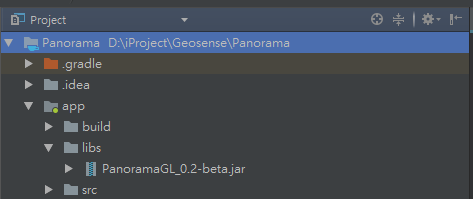
下載:PanoramaGL_0.2-beta.jar


放到 Android Studio 的 libs 
File >> Project Structure


程式碼:

package ibeacon.geosense.panorama;

import android.content.Context;
import android.os.Bundle;
import android.view.View;
import android.view.ViewGroup;
import android.widget.Toast;
import com.panoramagl.PLCubicPanorama;
import com.panoramagl.PLIPanorama;
import com.panoramagl.PLImage;
import com.panoramagl.PLView;
import com.panoramagl.enumerations.PLCubeFaceOrientation;
import com.panoramagl.hotspots.PLHotspot;
import com.panoramagl.transitions.PLTransitionBlend;
import com.panoramagl.utils.PLUtils;

public class MainActivity extends PLView {

    @Override
    protected void onCreate(Bundle savedInstanceState) {
        super.onCreate(savedInstanceState);

    }

    /**
     * This event is fired when root content view is created
     * @param contentView current root content view
     * @return root content view that Activity will use
     */
    @Override
    protected View onContentViewCreated(View contentView)
    {


        //Load layout
        ViewGroup mainView = (ViewGroup)this.getLayoutInflater().inflate(R.layout.activity_main, null);
        //Add 360 view
        mainView.addView(contentView, 0);
        loadPanorama();
        //Return root content view
        return super.onContentViewCreated(mainView);
    }


    /**load methods*/
    @SuppressWarnings("unused")
    private void loadPanorama()
    {
        try
        {
            Context context = this.getApplicationContext();
            PLIPanorama panorama = null;
            this.setLocked(true);
            PLCubicPanorama cubicPanorama = new PLCubicPanorama();
            cubicPanorama.setImage(new PLImage(PLUtils.getBitmap(context, R.raw.front), false), PLCubeFaceOrientation.PLCubeFaceOrientationFront);
            cubicPanorama.setImage(new PLImage(PLUtils.getBitmap(context, R.raw.back), false), PLCubeFaceOrientation.PLCubeFaceOrientationBack);
            cubicPanorama.setImage(new PLImage(PLUtils.getBitmap(context, R.raw.left), false), PLCubeFaceOrientation.PLCubeFaceOrientationLeft);
            cubicPanorama.setImage(new PLImage(PLUtils.getBitmap(context, R.raw.right), false), PLCubeFaceOrientation.PLCubeFaceOrientationRight);
            cubicPanorama.setImage(new PLImage(PLUtils.getBitmap(context, R.raw.up), false), PLCubeFaceOrientation.PLCubeFaceOrientationUp);
            cubicPanorama.setImage(new PLImage(PLUtils.getBitmap(context, R.raw.down), false), PLCubeFaceOrientation.PLCubeFaceOrientationDown);
            panorama = cubicPanorama;
            if(panorama != null)
            {
                //Set camera rotation
                panorama.getCamera().lookAt(0.0f, 170.0f);
                //Add a hotspot
                panorama.addHotspot(new PLHotspot(1, new PLImage(PLUtils.getBitmap(context, R.raw.hotspot), false), 0.0f, 170.0f, 0.05f, 0.05f));
                //Reset view
                this.reset();
                //Load panorama
                this.startTransition(new PLTransitionBlend(2.0f), panorama); //or use
                //this.setPanorama(panorama);
                Toast.makeText(this.getApplicationContext(), "panorama != null ", Toast.LENGTH_SHORT).show();
            }else{
                Toast.makeText(this.getApplicationContext(), "panorama = null ", Toast.LENGTH_SHORT).show();
            }
            //Unlock panoramic view
            this.setLocked(false);
        }
        catch(Throwable e)
        {
            Toast.makeText(this.getApplicationContext(), "Error: " + e, Toast.LENGTH_SHORT).show();
        }
    }

}


顯示情況


2018年8月30日

Android Studio unknown error (Sqlite code 14): Could not open database


在Android 6.0 版之後,想讀取使用者的行動裝置資料,需要經過使用都的准許後,才可以做使用,所以,在此記錄。

import android.Manifest;//需要import的函式庫

public static final int REQUEST_EXTERNAL_STORAGE = 1; //宣告
private static String[] PERMISSIONS_STORAGE = {Manifest.permission.READ_EXTERNAL_STORAGE, Manifest.permission.WRITE_EXTERNAL_STORAGE}; //宣告要開放的權限,這裡有讀、寫


//如果版本小於 23 就是 6.0 以下的版本,就不會跑下面方法
if (Build.VERSION.SDK_INT >= 23) {
        //訊問使用者
        int permission = ActivityCompat.checkSelfPermission(this,
                    Manifest.permission.WRITE_EXTERNAL_STORAGE); //檢查權限狀態
        if (permission != PackageManager.PERMISSION_GRANTED) {
                //未取得權限,向使用者要求允許權限
                ActivityCompat.requestPermissions(this, PERMISSIONS_STORAGE, REQUEST_EXTERNAL_STORAGE); //跳出准許的訊號框
        } else {
                //已有權限,可進行檔案存取}
                initDB();
        }
}


 /**
     * 請求權限回繢
     *
     * @param requestCode
     * @param permissions
     * @param grantResults
     */
 @Override
 public void onRequestPermissionsResult(int requestCode, String[] permissions, int[] grantResults) {
        super.onRequestPermissionsResult(requestCode, permissions, grantResults);
        if (requestCode == 1) {
            if (grantResults[0] == PackageManager.PERMISSION_GRANTED) {
                //表示授權成功
                initDB();
            }
}
    }

2017年12月14日

Android Studio 出現 Error:Failed to resolve: com.android.support:support-annotations:27.0.1 的問題


今天要修改 Android 的程式碼時,忽然出現,

Error:Failed to resolve: com.android.support:support-annotations:27.0.1 的錯誤訊息。


原因在於 Facebook 做了新的版本更改。

而當初的我,在  build.gradle (Module: app) 的寫法是

compile 'com.facebook.android:facebook-android-sdk:[4,5)'

上面的寫法會依照 Facebook 的版本進行更新。
然而,他們也使用了比較新的 android 版本去編寫,而造成了這個錯誤。

於是,我的解決方式是:
去官方網路看現在幾版,然後,降回一版試試
https://developers.facebook.com/docs/android/change-log-4x

於是,我就改成
compile 'com.facebook.android:facebook-android-sdk:4.27.0'

這樣就不會再出現上述的問題了。

2014年5月3日

Android HTC Desire 500,Line 無法顯示朋友傳送過來的照片問題解決方式!

今天,幫同事處理 Line 無法顯示朋友傳送過來的照片問題。
他的手機是 HTC Desire 500,而HTC Desire 500內建的4G ROM的路徑,是在 stroage/emmc/  的資料夾之下。如下圖:

因為,我同事沒有多裝SD卡,使得 Line 無法至SD卡 storage/sdcard0/ 的資料夾路徑抓取資料,而造成他接收朋友的照片時,應用程式無法將照片暫存到 storage/sdcard0/ ,而導致看不到照片。
但只要將SD卡裝上去以後,就可以正常顯示!